

As you know, I often use real-life cases to highlight the importance of cybersecurity. Today, I want to share a recent cyberattack carried out by a criminal group that targeted small businesses across several European countries through their network-attached storage (NAS) systems.
These situations are a clear warning for the healthcare sector, where data protection is critical, especially when facing threats such as ransomware in clinic NAS devices.
This is not a theoretical or fictional example.
The incident occurred in July 2025, and it’s one of the clearest examples of how cybercriminals are shifting their strategies.
The operation — named “Elicius” — was coordinated by the Italian Postal Police, with support from Europol, France, and Romania.
The criminal group behind it — known as “Diskstation” — was operating out of Bucharest, targeting small European companies via ransomware attacks on NAS devices.
At the time of arrest, authorities seized computer equipment, criminal documentation, and parts of the infrastructure used to launch the attacks.
And just like Noah began building the ark well before the flood, my goal is to help you take the right steps before it’s too late.
That’s why we’re going to analyse this case:
- How the attack was carried out
- What types of storage systems were targeted
- And why this matters for your clinic
These insights will help you understand how to prevent ransomware attacks on NAS devices in healthcare environments.
What Happened in the Ransomware Attack on NAS Devices — and Why It Matters for Your Clinic
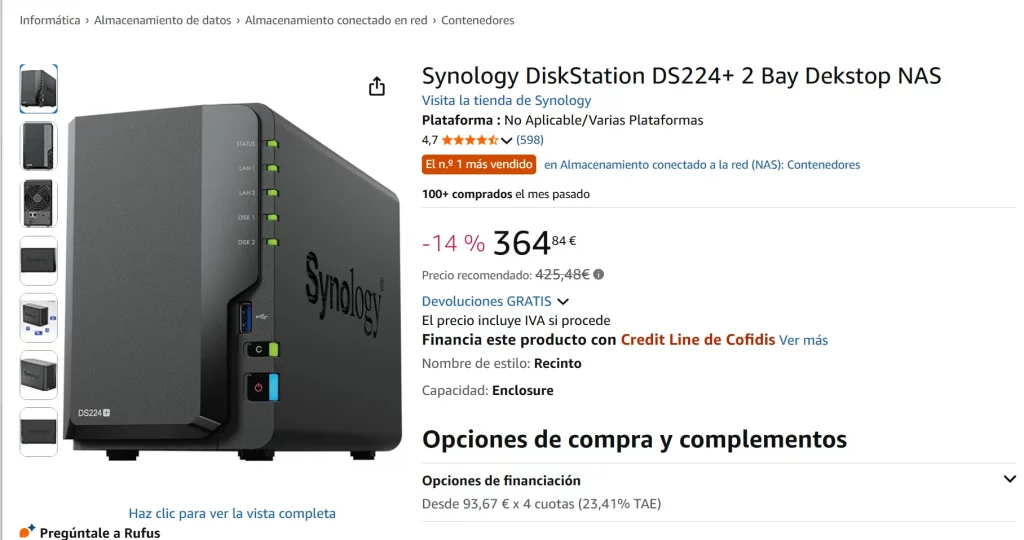
You might be wondering: what exactly is a storage device, particularly a NAS (Network-Attached Storage)?
It’s essentially a type of smart memory connected to a clinic or business network, allowing files to be stored, shared, and accessed from multiple computers.
Many dental clinics, private practices, and medical centres use these devices to store:
- patient records
- X-rays
- administrative documents
- patient databases
- and even backup copies
They’re seen as an affordable alternative to traditional servers — easy to install and requiring little to no technical knowledge.
But that same accessibility is often the reason security is misconfigured, and updates aren’t applied as they should be.
And that’s exactly what happened in this case.
The vulnerability was due to many users failing to update their NAS devices, even after manufacturers had released patches.
This made it easy for cybercriminals to deploy ransomware and encrypt all stored files.
It’s a clear example of how ransomware in NAS devices can directly impact clinics that rely on this type of technology.
How This Ransomware Attack on NAS Devices Unfolded — and Why It Worked
The targets weren’t large corporations, as many might assume.
We often think cyberattacks only affect big companies with huge data volumes and IT budgets.
But what we’re seeing now — and what will likely become even more common — is that attackers are shifting strategies: they’re increasingly targeting small and medium-sized businesses.
Why? Because these organisations often have fewer technical resources, lower awareness of cyber risk, and — most dangerously — they believe it won’t happen to them.
In other words, they closely resemble a private clinic.
This attack relied on a simple but highly effective technique: exploiting a known vulnerability in a specific type of NAS device.
The manufacturer had already issued an update to fix the flaw, but many users failed to apply the patch in time — and that’s what opened the door for attackers.
Once inside, the cybercriminals were able to:
- Access the system
- Move laterally through the internal network
- Encrypt all files: documents, images, databases — everything was locked.
They then left a ransom note demanding around €750, payable in cryptocurrency, along with step-by-step instructions, even for users with no technical knowledge.
This type of ransomware attack on NAS devices is becoming more and more common, mainly due to the lack of basic preventive measures.
Low Ransoms, High Profits: The New Model of Digital Extortion
In this case, the group demanded around €750 to unlock the encrypted files — a “manageable” amount for most businesses, but one that hides a dangerous logic:
they’re not after a big ransom, but many small payments with little resistance.
This strategy allows them to:
- Get paid quickly, with no lengthy negotiations
- Lower the risk of being reported, as victims downplay the damage
- Repeat the same attack at scale — targeting hundreds of similar businesses
And it works.
Because many small businesses simply aren’t prepared to lose their data, and even less so to refuse a ransom that seems “affordable”.
“I’m Not Important — No One Will Target Me”: The Biggest Misconception Making You Vulnerable
Cybercriminals know that small businesses — including clinics and private practices — often believe they’re not attractive targets.
But it’s exactly that false sense of security that makes them vulnerable.
Attackers know this perfectly well:
- They don’t have an IT department
- No one checks for device updates
- They rely on smart drives bought on Amazon or installed by someone “they trust”
- No offsite or encrypted backups
- And if the ransom is “reasonable”, they pay without hesitation — just to keep seeing patients
All of this makes clinics ideal targets for ransomware attacks on NAS devices.
What If You Pay the Ransom? The Problem Doesn’t End There
Even if you manage to unlock your files, there’s something many victims forget:
your data may have already been copied before it was encrypted.
Cybercriminals don’t just lock your systems. In many cases, they extract sensitive data before launching the ransomware attack.
What does that mean for a clinic?
- Your patients’ medical records could end up on the dark web
- Your invoices, tax details or internal documents could be sold to third parties
- You may be legally required to disclose the breach and face serious reputational damage
- And worst of all: if you pay and do nothing else, you remain exposed
- Because you haven’t solved the root problem
- You haven’t closed the door
- And you haven’t checked if someone’s still inside
How to Protect Your Clinic: Yes, Technology — But Above All, Trained Staff
When it comes to preventing these types of attacks — such as ransomware on NAS devices in clinics — it’s easy to assume it all comes down to tech:
firewalls, antivirus software, system updates…
And yes, those are important.
But there’s something even more critical: the people using them.
👉 (I recommend reading this article, click here.)
Because it’s not enough to have the right tools.
You need to know how to use them securely — and that requires awareness and training.
5 Essential Steps to Protect Your Clinic from Ransomware in NAS Devices
✅ 1. Appoint a Digital Security Lead
Even if you don’t have an IT department, someone must take clear responsibility for:
- Checking system and device updates
- Verifying backups
- Reporting incidents or anomalies
✅ 2. Keep All Devices Updated — They Also Need Routine Checks
Just like you routinely check your autoclave, suction unit or dental chair, your digital systems need regular attention too.
Always update:
- Smart storage devices (NAS)
- Reception and consultation computers
- Patient management software
- Antivirus, routers and connected apps
✅ 3. A Backup Is Useless If It Also Contains the Infection
Having backups is crucial — but if they’re connected to the same infected network, they won’t help.
Just like you wouldn’t reuse contaminated instruments, you can’t restore from a compromised backup.
✅ 4. Your Team Knows Clinical Protocols… But Can They Spot a Cyber Risk?
One wrong click on an email can trigger a disaster.
Train your team on the basics:
- Spotting suspicious messages
- Not opening unknown files
- Knowing who to report issues to
A well-trained team is a well-protected clinic.
✅ 5. From Autoclave to Digital Protocol: Protect Yourself from All Types of Viruses
In your clinic, you already sterilise instruments, use an autoclave, and apply clinical prevention protocols.
But what about your digital hygiene?
Having a clear cyberattack protocol is just as important as having one for infection control.
Because just like clinical viruses, the key is to prevent, act quickly, and know what to do without losing control.
What If Tomorrow You Couldn’t Even Open Your Schedule?
Imagine this: you arrive at your clinic tomorrow, turn on your computer… and you can’t access anything.
No appointments. No patient records. Everything is locked.
Would you know what to do?
This isn’t science fiction.
It’s real.
It happens every week to clinics and small businesses who believed “this only happens to big companies”.
Thinking you’re not interesting to cybercriminals is exactly what makes you vulnerable.
✅ Summary Checklist for Your Clinic
Ask yourself these questions today:
- Is someone checking for updates on all devices?
- Do I have a verified, external backup?
- Has my team received basic cybersecurity training?
- Do we have a clear protocol if the system fails or data becomes encrypted?
- Are our network-attached storage devices properly secured?
If the answer to any of these is “no”, it’s time to act — calmly, but without waiting until tomorrow.
And remember: lock the doors… and the ports.
Cyber-protect your clinic.